
Today’s in our Blogging 101 series is how to optimize photos for your blog. Read on to learn why this is important and how to do it!
4 Tips on How to Optimize Photos for Your Website/Blog:
1. Select an Image that Fits: The reason someone may choose to click on your blog post is not only for the content but for the visual. That is why it is essential that you pick and photo that accurately represents the piece, is eye-catching and appropriate. Whew! Quite the order for a picture, huh? An easy place to start is Flickr. Find out more about using this service to find great, free images in our Adventure into Flickr: Finding Free Pictures for your Blog post. 3. Pick a File Name With Meaning: What’s in a name? A lot of SEO value! When naming your picture file, use a keyword related to your post topic. Try not to be extremely general, but not too specific Strike a balance and use the Google Keyword Tool to help in your decision because this is partially how search engines determine the rank of the image. Generally, you will just want to use the keyword used in the rest of your blog.
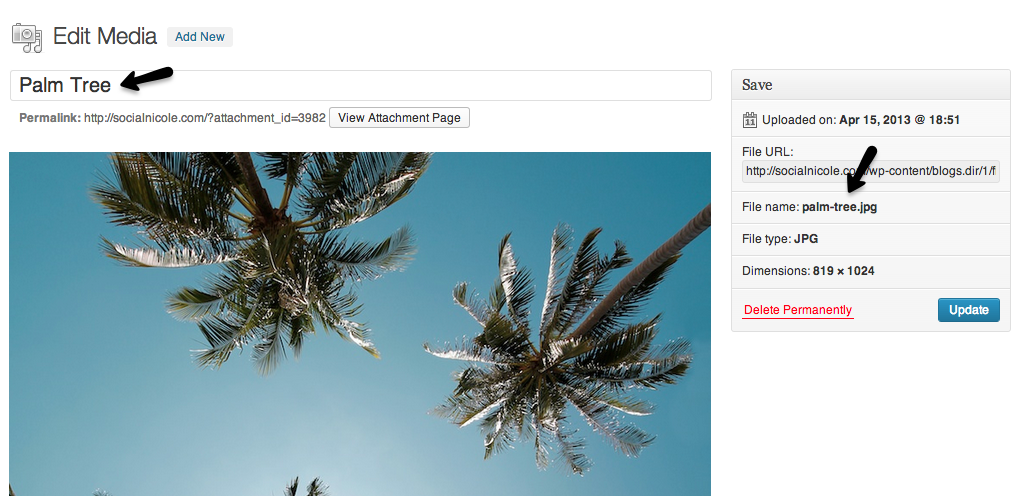
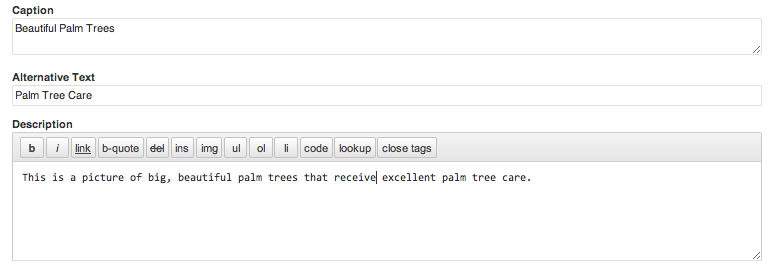
3. Use Alternative Sections: Something that can be easily missed and a great SEO opportunity are the alternative sections of a picture. As you can see below, you have the change to fill in a caption, alternative text and description for each image you post. While we generally don’t put a caption with photos, that is entirely up to you. The alternative text and description sections are another way to rename or go more in depth with what the picture/post is about. Once again, keywording is important so do your research!
4. Use the Right Amount of Visuals: There’s nothing worse than having too many or two few images in in your blog posts! Too many get annoying and distract form the content, too few and it feels like a marathon of reading with no breaks. While photos are always a great way to grab attention and gain SEO value, make sure they aren’t overkill. Our rule of thumb is at least one photo. We usually center it at the top while some wrap it around their text – that is a personal preference but one you need to be consistent with. It may take a while to get the hang of it, but look around at some of your favorite blogs or even successful competition for an idea of the “right balance”.
Missed a previous Blogging 101 post? Never fear!
Blogging 101: Google’s Keyword Tool Blogging 101: Yoast SEO Plugin Blogging 101: Resize a Photo for Online Use Interested in help with your company’s blog or website? SocialNicole is here to help! Want to see us blog about something specific in our Blogging 101 series? Share below! Photo Credit 1 Photo Credit 2