With a hectic and busy schedule, it can be hard to remember to post a Facebook update or share the latest industry news with your community. Never fear! Facebook has made managing a fan page a bit easier by rolling out the Facebook scheduling tool! Now even on those days that you’re short on time, you can still keep your Facebook page filled and your fans happy. Your Facebook fan page and community should never be neglected and now you can make sure that you’re updating more than ever! The tool itself can be slightly tricky to get used and we know you’re crunched for time! So here at SocialNicole we’ve created a quick, easy and visual guide to lead you through the process.
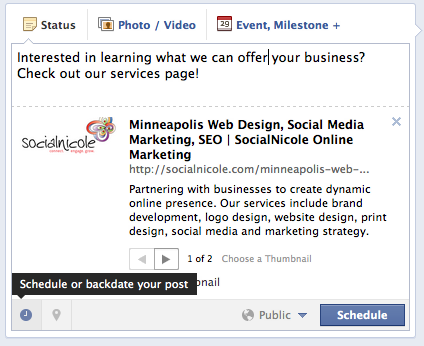
Step 1: Write your Post As you normally would, write your latest update, attach a link, share a picture and get it all set up but don’t hit that share button just yet! 
Step 2: Time to Schedule Now that you have your fabulous content, it’s time to schedule it! In the lower left corner of your new post, click on the clock that says “schedule or backdate your post”. Once clicked, you can schedule according to your needs. From year to month to day to hour to minute, you can customize it to fit your needs. You can even add a location to your post. After you’ve decided when to schedule it, Click schedule and you’re set!
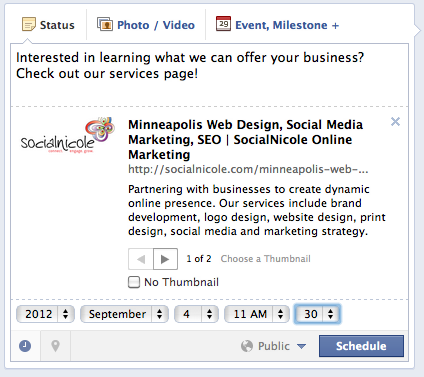

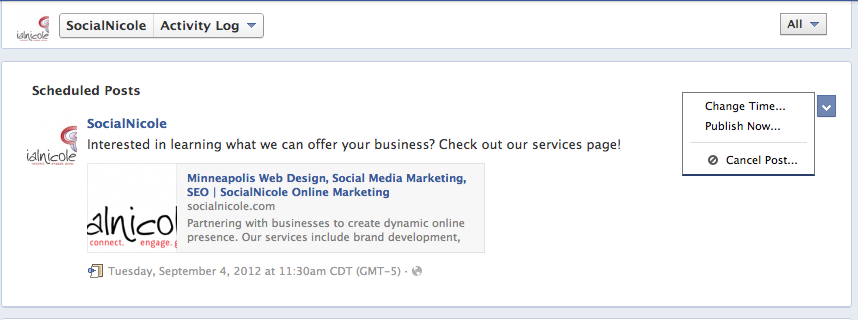
Step 3: Review Your Scheduled Posts Take some time to make sure all your posts are scheduled to go out correctly or change a date or time by checking out your Activity Log. To do so, scroll to your admin panel, click edit page, and in the drop down bar click activity log. Here, all scheduled posts can be seen and you an edit to your heart’s content! 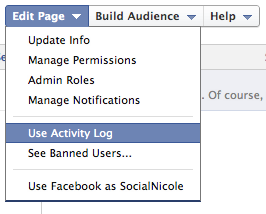
Step 4: Sit Back and Relax Well, you probably won’t have time for that with your busy schedule! But at least have piece of mind that your Facebook fan page is being taken care of! Now you make think you’re a pro at scheduling, but check out a few of these extra reminders below: Facebook Scheduling Tool Reminders:
- You can backdate your post! Especially great for customizing your timeline with milestones!
- Hate to burst your bubble, but you cannot schedule every post. i.e. events, the question tool or photo albums are not available to be scheduled out.
- Have your Facebook connection to Twitter? Sorry Charlie, scheduled posts won’t automatically be Tweeted out. Here at SocialNicole, highly recommend you do NOT connecting the two accounts anyway! So keep that in mind!
- Remember you can edit any of the posts you’ve scheduled before they go out!
- Make sure you are interacting on your Facebook page and not simply scheduling all your posts and forgetting about the page each week. Social media is not meant to be automated and when you simply schedule all your posts with no human interaction it becomes meaningless. We recommend you schedule one post per day and plan on posting live once per day to keep you your page fresh and interesting. For many of our clients we are looking for current content, pictures etc. that we can post in real time to keep the human element of the page. Remember people interact the most with photos so don’t forget to find the compelling photos to share!
Have you used the Facebook post scheduler yet? What do you think? Share your thoughts below!