Digital Marketing Agency | Minneapolis
Building and expanding online presence with vision, strategy, and results.

If your business runs a blog, you know it can be a very important and profitable part of your marketing plan. But if you’re new to blogging (and even if you’ve been doing it for a while), you might be intimidated by the creature of SEO: search engine optimization. Although SEO is intimidating, it is an important part of your business plan. Optimizing your blog posts for SEO will lead to more traffic and can equate to more business.
We’ve compiled a user-friendly list of ways to optimize your blog posts for SEO. These tips include using keyword phrases and images within your posts, making sure each post has quality content, using your business’s social media to drive traffic to your blog, and using a WordPress SEO plugin to review your post and advise on areas of improvement.
5 Tips for Optimizing Business Blog Posts for SEO
1. Using The Right Keywords
One important element of SEO for your blog is using the right keyword phrases. A keyword phrase is a short phrase that best encompasses the content topic of a blog post. When you write a post for your business’s blog, research to find the best keywords for the topic you are writing about. Your keyword phrase should be specific to the business or field you are in and specific to the topic. It can also help to use a keyword that is popular when possible.
Once you’ve developed a great keyword phrase, use it often within your post. It’s important to try to use the keyword in your post’s title, headings, and subheadings, as well as in the captions and titles of your images. The more you use your keyword phrase, the better chance you have of a search engine finding your post and having it appear in someone’s search.
While using your keyword phrase frequently is important, you do not want to overuse it. This is called “keyword stuffing,” and the Google algorithm penalizes websites that do this. When creating your blog post, write quality copy and use the keyword phrase in a way that makes sense and flows for the reader. Writing a blog post is an art and a science, and you do not want to compromise the quality or flow of your post merely by including your keyword phrase frequently.
2. Optimizing Images For Search
Optimized images are another important element of SEO for your blog post. If you’re including images in your blog posts, two aspects must be optimized for SEO: the image’s file size and the file title.
When optimizing an image’s file size, there are a few parameters you will need to consider. These include the size of kilobytes (we keep ours under 100 KB), the type of image file (JPEG), and the quality of the image. These are all important because they allow your server to serve images quickly and avoid slowing down the website. If it takes over 2 seconds for a page to load, your readers will most likely leave it. The Google algorithm will penalize a slow-loading webpage, hurting your site’s SEO ranking.
For a detailed guide to resizing images for WordPress, read Resizing Images for WordPress: A How-to Guide.
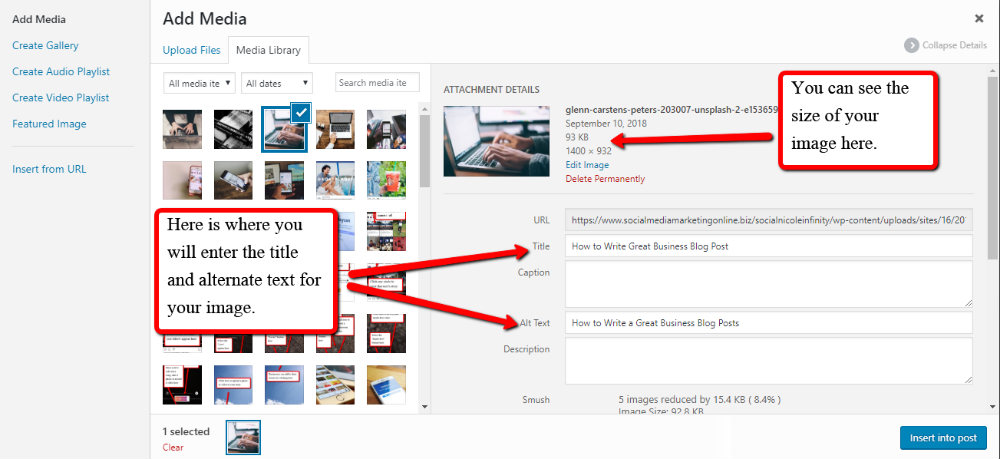
Before uploading an image to your blog, you want to rename the image with a file name optimized for SEO, using the keyword phrase you chose for the post. Also, when uploading an image to your WordPress blog and most other content management platforms, you can add a title and alternate text for the image. You can also use the title and alternate text for the image to fill the description box. The title, alternate text, and description can be the same. It should be a short sentence that contains your keyword phrase and somehow describes the image. You are not required to fill in these fields, but they are helpful for SEO.
3. Creating Content That Is Optimized
You must produce quality content when presenting your business to the online world. Well-written posts that address a topic will keep your readers interested and engaged. Along with writing quality content, there are some practical elements you can implement to help make your posts perform well.
1. Length is an important element. In the early days of blogging and SEO, producing more articles to show Google you had new content and length was not as important. Short and easy-to-process posts were desired. Today, there is evidence that longer articles rank higher with Google. While length is important, remember to maintain quality over quantity in your blog posts.
2. Splitting your posts into sections with headings and subheadings is also helpful. In WordPress and other content management platforms, you can select HTML subheadings from H1 to H6 to indicate hierarchy.
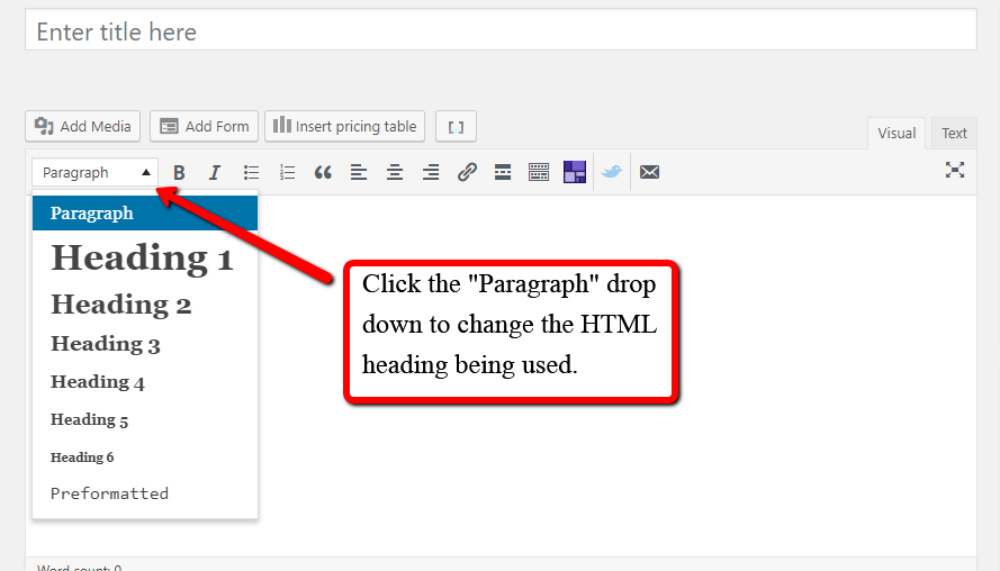
Search engines scan these headings to determine the structure and content of a post. Make sure to include keywords in your headings and subheadings. Posts that contain headings used in the proper hierarchy are rewarded in a Google search.
Make sure to honor the hierarchy when using HTML headings. Use H1 once but only once within an article – this is the most significant and primary heading. Use the other headings to achieve proper hierarchy; for instance, try not to jump from H2 to H4 and back to H2. After using H1, H2, and H3, use H4 – H6 minimally, as these lower HTML headings do not hold as much weight in SEO. Structuring your blog post using headings and numbered or bullet-pointed lists can also help your blog posts be more reader-friendly.
4. Social Media For SEO
Optimizing your blog posts is crucial for getting traffic to your site. Google sees this and gives more juice to sites that receive more traffic. Traffic to your site tells Google that people frequently visit your website and signals that you are an expert in your field.
You can increase traffic to your website by sharing your blog posts on social media. When you link to your blog on your social media channels, the link clicks from your followers drive traffic to your blog. Both organic social media posts and paid ads can aid in driving traffic by getting the link out to many people. For instance, using Facebook ads to promote your posts can greatly increase the number of people who see your content.
5. Leveraging SEO Plugins
Your business can use plugins in addition to your content management platform to help you optimize your post and then gauge how well it is performing after it has been published.
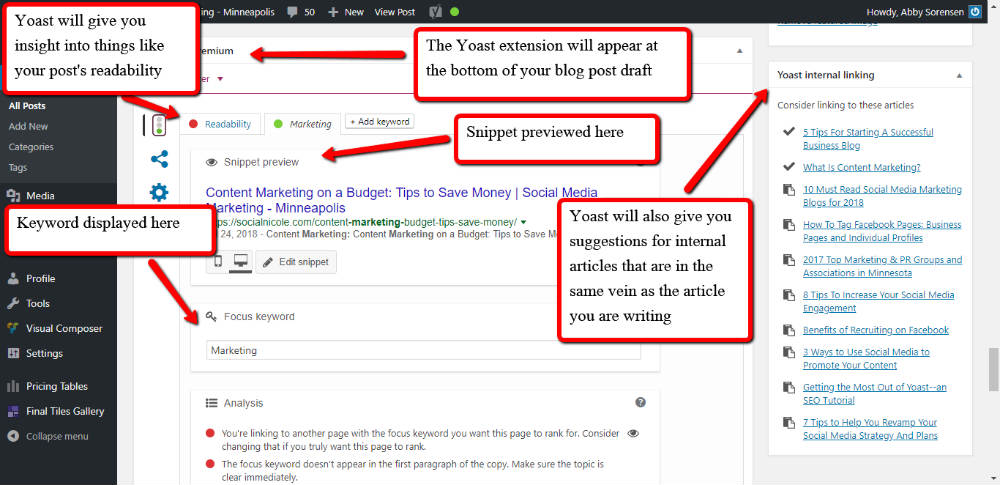
At SocialNicole, we develop and use WordPress websites because WordPress is the #1 largest content management platform in terms of users. WordPress is extremely SEO-friendly. Our favorite plugin is Yoast, which displays the strength of the post based on the keyword you enter and parameters that affect SEO. Things like readability, keywords in meta-data descriptions and titles (what shows up in Google Search), and headings are evaluated. Yoast will give your posts a colored dot, with a key to the color code at the bottom, telling you the strength of your post. Yoast will also tell you what you can do to improve it.
Being patient and understanding that SEO can be a long process is important. Creating a wildly successful blog with thousands of readers will not happen overnight. However, it can happen over time if your business consistently optimizes each post and ensures each post is the best it can be. Keywords, images, headings, paragraphs, and length can all be curated to benefit SEO. Sharing your business’s blog posts on your social media platforms can also help optimize your posts by driving traffic to your site.
Want help with your SEO and blogging? Contact us and let’s talk.