Have you ever encountered a message like this from Facebook or other social media channels?
Dear User,
It has come to our attention that your account has violated our community guidelines. Your account will be shut down soon.
To appeal this decision and avoid the suspension of your account, please click here: link.com
The Facebook Security Team
What’s your first reaction to a message like this? Do you feel flustered and pressured to react right away? If you’re like me, your first impulse might be to try to jump in and fix the problem. You don’t want your account to become suspended, and, at first glance, a message like this might look legit. It claims to be from Facebook and might even have the Meta logo in the message. Unfortunately, these messages are intended to make you panicked, urging you to act before something bad happens.
When I started working in social media and digital marketing over 15 years ago, I never imagined handling online security would become such a large part of my work. Yet, launching a social media and digital brand marketing agency and working with hundreds of clients has led me to gain extensive knowledge on keeping social media and online accounts safe. In this blog post, I am sharing my top tips for recognizing threats to your online security and what you can do to protect your brand’s digital presence from hackers and phishers.
Table of contents
- 1. Phishing Attempts Are Getting Smarter, So You Have to Too
- 2. When Was the Last Time You Updated Your Password?
- 3. Next, Use Strong Security Questions
- 4. I Know: Two Factor Authentication (2FA) Is a Pain – But IT IS A Must
- 5. If Your Email Is Not Secure, Your Accounts Won’t Be Either
- 6. You’re Only as Strong as Your Weakest Link: Get Your Team Behind You
- 7. Get Up to Date on Who’s In and Who’s Out: Be Picky About Who You Allow Access
- 8. Keep Viruses at Bay: For the Love of God, Update Your Computer Software and Plugins
- Final Thoughts About Online Security
1. Phishing Attempts Are Getting Smarter, So You Have to Too
When I started my social media marketing career in 2009, cybercrime attempts seemed relatively easy to recognize. But over the years, attempts have become much more sophisticated. Any discussion about online security should start with a conversation about phishing, as phishing continues to be the number one way cybercriminals gain access to private information.
What Is Phishing?
First of all, what exactly is phishing? We often hear these terms and need help to define them accurately. The Oxford Languages Dictionary defines phishing as:
“The fraudulent practice of sending emails or other messages purporting to be from reputable companies to induce individuals to reveal personal information, such as passwords and credit card numbers.”
Phishing attempts are often very convincing and have increased exponentially in recent years. As a social media and digital brand marketing agency, we see an average of 2-3 phishing attempts on each client’s social media accounts weekly. The attempts usually come through the direct messages of the client’s social media channels but can also come via email. The phishing attempts are relentless and never-ending.
The phishing attempts we see today are much more targeted and specific than in the early days of social media marketing. The attempts are now often called “spear phishing” because they are often personalized and offer a compelling reason to click and log in to solve the problem that the cyber criminal has positioned in the phishing message. This means we as users need to be even more savvy than in the past.
Recognizing Phishing Attempts
While some phishing attempts appear easy to recognize, they are often disguised as emails or messages from reputable businesses (like Facebook or Google). They are meant to drive you to click a link to sign in and resolve the issue.
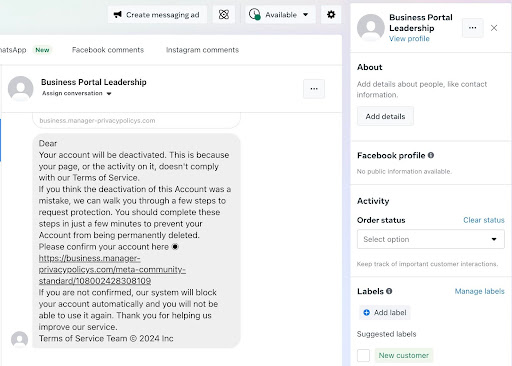
To give you an idea of what phishing attempts could look like, check out this real-life example sent to my client’s Facebook inbox:
Primary Indications of a Phishing Attempt
Though the message above may initially look official and convincing, there are several tell-tale signs that this is a phishing message you should avoid.
- The message is from a vague profile name with no details or profile photo.
- The message isn’t addressed to anyone (indicating that it’s probably a boilerplate sent to multiple accounts).
- The message pressures you to act “within a couple of minutes.”
- It’s making threats against your account.
- It’s asking you to click a strange link and log in to resolve the issue.
Further Tips for Recognizing Phishing Attempts
When dealing with phishing attempts, here are extra tips to keep in mind:
- Be cautious and extra wary of any messages from accounts you don’t recognize.
- Be cautious about clicking any link in an email or text that requires logging in. Always research or scope out the source before stepping forward. I advise you never to click the link; you can contact the source and customer service to inquire if an issue needs to be solved.
- Be wary of any messages containing excessive spelling or grammatical errors.
- Don’t be fooled by messages that use urgency or threats to get you to do something (e.g., click this link to keep your account from getting suspended).
- Never provide info for messages asking for your financial or credit card information or any other sensitive data.
- Remember that no social media or online account will ever ask you for your password in an email or direct message.
- If you work with a reputable marketing agency, they can be an excellent resource for identifying and handling anything related to hacking or phishing. I always encourage clients to forward anything questionable to me and my team so we can help them determine the claim’s validity if they have questions.
What Do You Do if You Identify a Phishing Attempt?
Once you’ve identified the signs of phishing, what are your next steps? Aside from ignoring these phishing messages, I advise clients to take extra precautions to avoid future harm.
- Report the suspicious messages to the online source or social platform on which you experienced the phishing attempt.
- Delete/remove the message from your inbox so no one else comes across it or is fooled into clicking the suspicious link.
- Educate your staff about the attempt and ensure they know the company protocol or manage these messages.
Now that we’ve covered what to watch out for and how to react to phishing attempts, let’s move on to the other pillars of online security.
2. When Was the Last Time You Updated Your Password?
I get it–it’s always a pain to keep track of and update passwords, especially across multiple accounts and platforms. It doesn’t help that security experts now recommend changing your password every three months to be safe. But wait! That’s ridiculous. Who has time to change all their passwords every three months? It can be overwhelming to manage. Here are some tips that I have found helpful for choosing and managing passwords.
Tips for Choosing New Passwords or Changing Your Login Password:
- Don’t be that person who uses your birthday, name, address, phone number, or common words.
- To create a strong password, choose unique word combinations containing a mix of uppercase and lowercase letters, numbers, and special characters.
- Avoid using the same password across multiple platforms.
- Avoid sharing your password with others, as it increases the risk of compromising numerous accounts if one gets hacked.
- Consider using password management software and allowing the software to select the passwords for you. While these will be complex passwords, and you must access them through the software, they will be much more secure. At SocialNicole, we use LastPass for password management. See more about my LastPass recommendation here.
Tips for Password Management:
With multiple social accounts for various clients, I have more passwords than I can count or keep track of. This means I use password management software to help me stay organized and secure. Most password software programs allow for single-user or enterprise-level accounts. An enterprise account simply means you can add team members to the account to give them access to the software. I advise business owners to use software with both options to grow as their company needs to grow.
What Password Management Software Do I Recommend?
At SocialNicole, I use LastPass to keep track of passwords, and it’s a lifesaver. The nice thing about LastPass is that it is free software for individual users but also allows businesses to grow and use it with teams if needed (the fees for teams are very reasonable and worth the investment).
- Why I Use Last Pass:
- It’s the top choice for password protection for businesses.
- It allows you to store passwords and autofill log-ins across devices safely.
- It uses top-tier encryption technology.
- LastPass For individual Use:
- LastPass helps you save all passwords in one place.
- It allows you to add log-in information through a browser extension automatically.
- It will autofill your log-in information.
- It’s also easy to organize passwords in different folders and keep secure notes for your accounts.
- LastPass For Team Use:
- It allows you to share passwords and log-in information without actually sharing passwords.
- As an admin, you can hide passwords from anyone else using the account while still giving team members access to accounts.
- You can give temporary log-in access while not compromising any of your passwords.
3. Next, Use Strong Security Questions
While changing passwords frequently and choosing secure passwords is essential to online security, taking the extra step to use strong security questions when possible is also an important way to secure your accounts.
Just like with a new password, there’s nothing worse than forgetting the answer to your security question. I know it’s tempting to use questions with answers that are easy to remember, such as, “What is your mother’s maiden name?” But security questions should be just as safeguarded and unique as your password.
Tips for Selecting Strong Security Questions
When choosing security questions (and, more importantly, thinking about your answers), keep these three things in mind:
- Never use questions with answers that can be found online, like family names or even past addresses. This information can also be obtained by hackers and phishers, and it will make gaining access to your account all the more easy for them.
- Use answers that are still significant and personal to you but not ones you can track down on the internet, such as your first pet’s name or the place you first met your significant other.
- Take advantage of password management software to store hints for remembering your answers so you never forget them.
4. I Know: Two Factor Authentication (2FA) Is a Pain – But IT IS A Must
I know I’m hitting you with another acronym but stay with me here.
What Is 2FA?
Two-factor authentication (2FA) is a secondary way to prove your login credentials are authentic. It usually involves entering a code sent to your phone or email and entering your username and password.
Why 2FA Is a Must
I understand the hesitancy of enabling 2FA–as a team of busy professionals, my agency hates nothing more than a waste of time. However, enabling 2FA is one of the most fundamental steps to enhance your online security–and one strongly recommended by security experts. By enabling 2FA, you’re adding an extra layer of protection to your account that serves as a backup to your regular log-in method.
For 2FA to be effective, it should be enabled and used not just by you but by every team member who has access to your Facebook page. You’ll also get alerts if someone tries to log in from a non-recognized device or location. Though it does require an extra bit of time, it also ensures that even if someone does obtain your password, they won’t be able to access your account without the second authentication factor.
5. If Your Email Is Not Secure, Your Accounts Won’t Be Either
My email is the ground zero for my business operations. It’s my primary communication source and the key to nearly all my internet accounts. I’m guessing the same is true for your own business.
Given email is a central point of information and verification, if your email isn’t secure, your social pages probably aren’t either. Trust me on this–no matter how many security measures you put into your social media and online accounts, it won’t matter if your email security is weak. I’ve listed tips below to help you secure your email and, therefore, secure your social media.
Tips for Email Security
- Use a robust and unique password that you change regularly.
- Use security questions with answers known only to you.
- Use 2FA to authorize your email log-in.
- Set requirements through your email server for both you and your team to update your email passwords every few months.
- Do not click on suspicious links (follow the same information above to handle these links).
6. You’re Only as Strong as Your Weakest Link: Get Your Team Behind You
From running my own digital marketing agency, I’ve learned that maintaining security can be tough with a team of people. The more people have access to your accounts, the higher the risk of compromise. Regarding my clients’ security, I map out who gets access to what accounts to ensure that our and the client’s data is safe.
Here’s What I Implement with My Team at SocialNicole and Recommend to Others for Maintaining Online Security for Teams:
- Create an online security standard operating procedure guide for all team members to follow and implement initial internet security training for any new hires.
- Share examples of phishing attempts regularly and ensure everyone is educated about the methods used by phishers and hackers.
- Set up reminders for regular password changes.
- Stress the importance of strong passwords and inform the team how to set them.
- Ensure everyone is set up with 2FA and uses the same authentication app. Also, 2FA should be set up on all major online business accounts.
- Keep open lines of communication and encourage team members to report any suspicious activity or security threats.
- Evaluate your own security protocols regularly and adjust them as needed to accommodate the ever-changing updates or terms of use across social media platforms.
- Have an incident response plan. Should a security breach occur, ensure you have a documented strategy for proceeding and that all team members know their roles and responsibilities.
7. Get Up to Date on Who’s In and Who’s Out: Be Picky About Who You Allow Access
Because I oversee a team of people, I have to walk a fine line between ensuring my employees can do their jobs and being careful about who is given access to what. I assign appropriate access levels to the individuals managing my clients’ online accounts to minimize the risk of unauthorized access. My own rule of thumb is never to give anyone access who doesn’t need it. However, I always ensure two different admins have full access to an online account. This ensures that the second administrator can help regain access and let the other back in if access is compromised.
Keep in mind that different social platforms offer different permission levels, which can help differentiate access levels for team members. For example, when I grant administrative access on Facebook, I make sure to distinguish between “Partial Control” and “Full Control” within the “Page Roles” section of Meta’s Business Manager. This helps me limit who has access to sensitive settings within a page and sets up tiers of who I trust with full access.
8. Keep Viruses at Bay: For the Love of God, Update Your Computer Software and Plugins
Why do I always ensure my team and I keep our computers updated? Outdated software creates weak spots for security and greater possibilities for viruses. One of my biggest pet peeves is someone complaining about experiencing computer problems but not ensuring their computer or browser is fully updated first. It’s incredible how much can be resolved by ensuring everything is up to date and running as needed.
Ensure your computer and mobile devices are updated with the latest operating system updates, antivirus software, and web browser versions. Additionally, check that any plugins or applications connected to your social page are updated regularly. Outdated software can contain vulnerabilities that hackers can exploit.
Final Thoughts About Online Security
There are few things I hate more than seeing the individuals, businesses, and nonprofits I work with fall victim to cybercrime–especially when there is so much you can do to protect and prevent your online presence. In my fifteen years of running SocialNicole, I’ve never had a client’s social media accounts hacked, which is a testament to the fact that proper precautions, like the ones listed above, actually work.
Remember, as technology becomes more sophisticated, so do the tactics of hackers and phishers looking to exploit you and your business. This means you must stay smarter, more savvy, and one step ahead. Protecting your brand’s information across online accounts and social media channels also protects its reputation, security, and customer trust. Simply employing one of the tactics listed above is not enough–it takes layers of action to protect your privacy on all sides, and you need your whole team to be aware of the strategy for it to remain strong.
Need more help securing your Facebook Business Manager account or any other online channels? Drop me a note and let’s talk.